

Saved locally. Now what?
In the previous post, I covered how Accumoo saves progress locally without waiting for the network. SQLite handles the save, the UI reflects the committed change, and the user goes about their day.
Meanwhile, their iPad sitting at home knows absolutely nothing about it.
Getting that change onto another device is the next challenge. Each device has its own local data, and users can make changes while their other devices are offline. Connections drop, requests get retried, and sometimes both devices edit the same data before the others know about it.
This is where Accumoo’s synchronization Sync (synchronization) sends changes from your device to Mohojo Werks’ servers and brings those changes to your other devices when they sync. This keeps your Accumoo data up to date across devices. architecture picks up: pushing locally saved changes to the backend, pulling these changes down to each device, and handling any conflicts along the way.
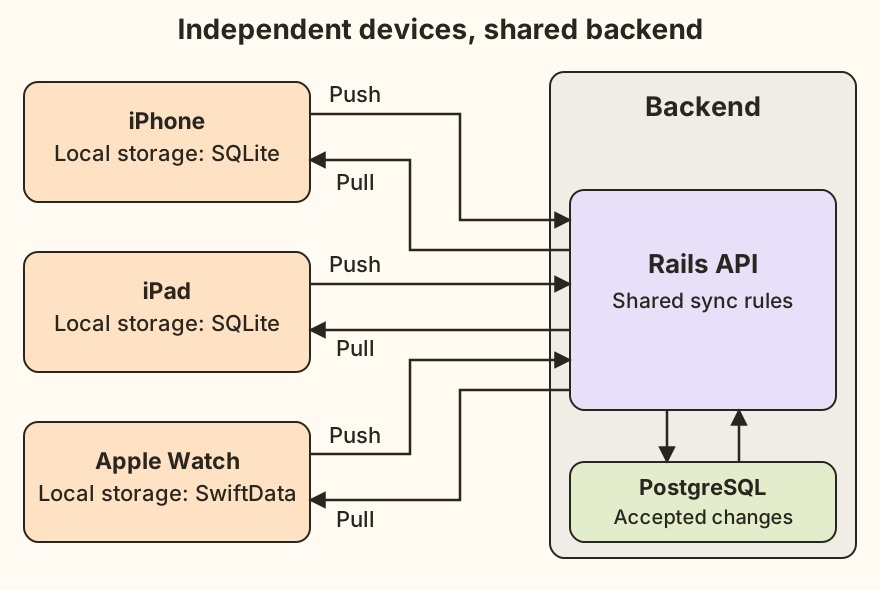
Open full-size diagram: independent devices and the shared backend
The backend connects the devices
Accumoo’s iPhone, iPad, and Apple Watch apps synchronize through the same Rails API, backed by PostgreSQL. Each client pushes its local changes to the API and pulls changes from the backend for their account. Each device can be online at different times; a direct connection to each other is not necessary.
The iPhone and iPad apps use SQLite for local storage; the Watch app uses SwiftData. Each client manages its own local data and communicates with the API independently. The Watch app is able to synchronize without the iPhone app running.
The backend applies server-side rules before accepting changes and makes accepted changes available for the other devices to pull. A successful local save doesn’t mean the change has synchronized. The backend still needs to accept it before other devices can retrieve it. This distinction matters when a request fails or two devices have competing edits.
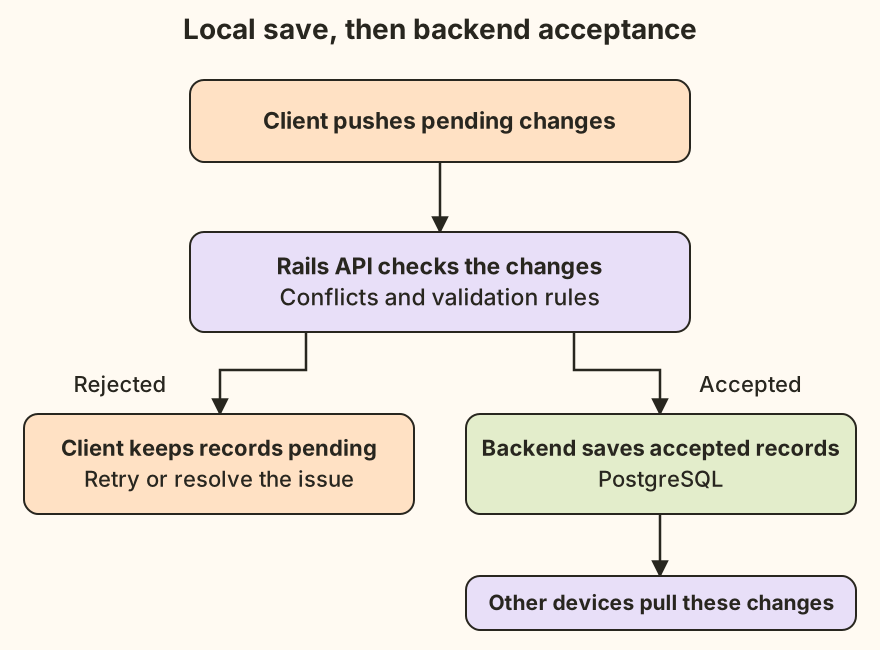
Open full-size diagram: backend acceptance before other devices pull
Getting changes there—and back
On the iPhone and iPad, locally changed data is marked as pending synchronization in SQLite. This status survives app restarts, allowing the client to resume unfinished synchronization later.
For Event An activity you want to track, such as reading, walking, or staying hydrated. data, the client broadly follows this sequence:
- Push pending local changes to the API.
- Mark accepted records as synchronized; keep rejected records pending.
- Pull changed Events, then their history A read-only view of recorded counts and past periods. Open an activity's menu to find it. , and merge them into the local database.
- Save a server-provided sync timestamp after the synchronization cycle completes successfully. The next pull requests changes since this timestamp.
Pushing first lets the backend process this device’s pending changes before the client pulls the resulting server state. The following pull can therefore include those accepted changes alongside updates from other devices, bringing the client up to date in the same synchronization cycle. Pending local edits still need protection during the merge; request order alone doesn’t prevent conflicts.
Events are pulled before history because each history record belongs to an Event. Pulling the Events first ensures these Event records exist locally when their history arrives.
If the push succeeds but the pull fails, accepted records stay marked as synchronized. The client retains its previous sync timestamp so the next pull still includes changes it may have missed.
A successful HTTP response doesn’t mean every record was accepted. The client checks the response and only marks the accepted records as synchronized.
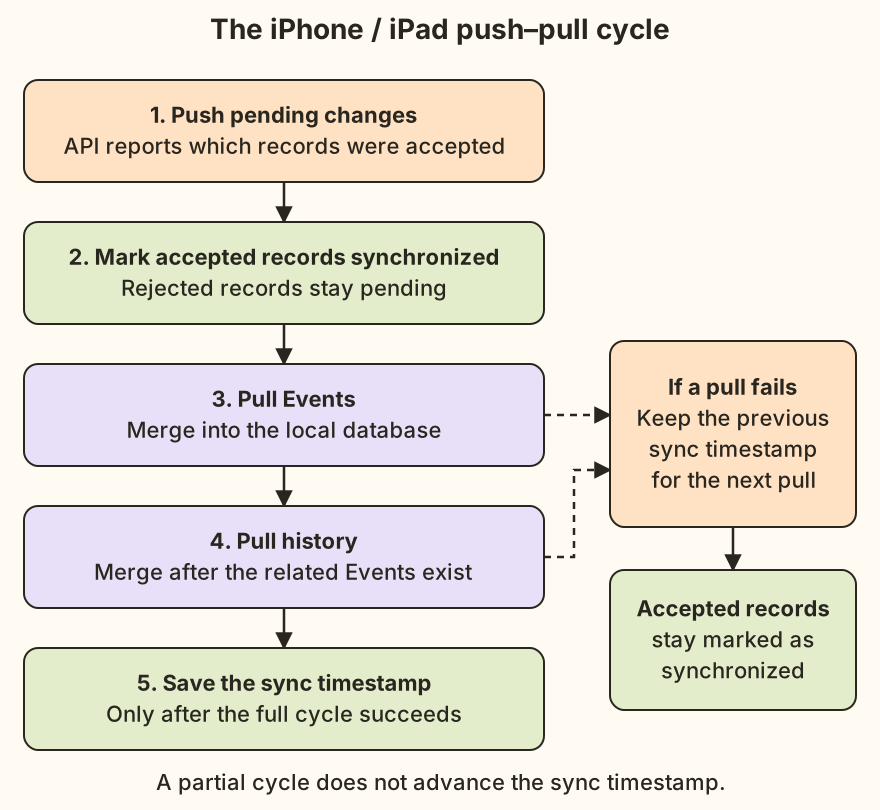
Open full-size diagram: the push and pull cycle
When the network leaves you guessing
A failed push doesn’t always mean the backend failed to save the changes. Consider this sequence:
- The client pushes its pending changes.
- The backend saves them and sends a response.
- The connection drops before the client receives the response.
The backend has the changes, but the client has no confirmation. The records remain pending locally and can be included in the next push.
Retries need to be idempotent: pushing the same record again must not create a duplicate. Accumoo preserves the record’s original UUID so the backend can recognize it.
The backend uses this ID to find an existing record or create it if it hasn’t arrived before. Re-pushing the same history record, therefore, targets the same record rather than creating a duplicate.
The client also needs to distinguish a retry from a new user action. Tapping + again creates a new history record with its own ID; retrying the previous push maintains the ID of the history record previously saved locally.
Stable, unique IDs address duplicate records, but they don’t decide which version of an Event should “win” when two devices push a competing edit. This requires conflict The backend cannot accept a device's Event version because it conflicts with the saved version. On iPhone and iPad, review both versions and choose Keep Mine or Use Server Version. Apple Watch uses the backend's version. handling.
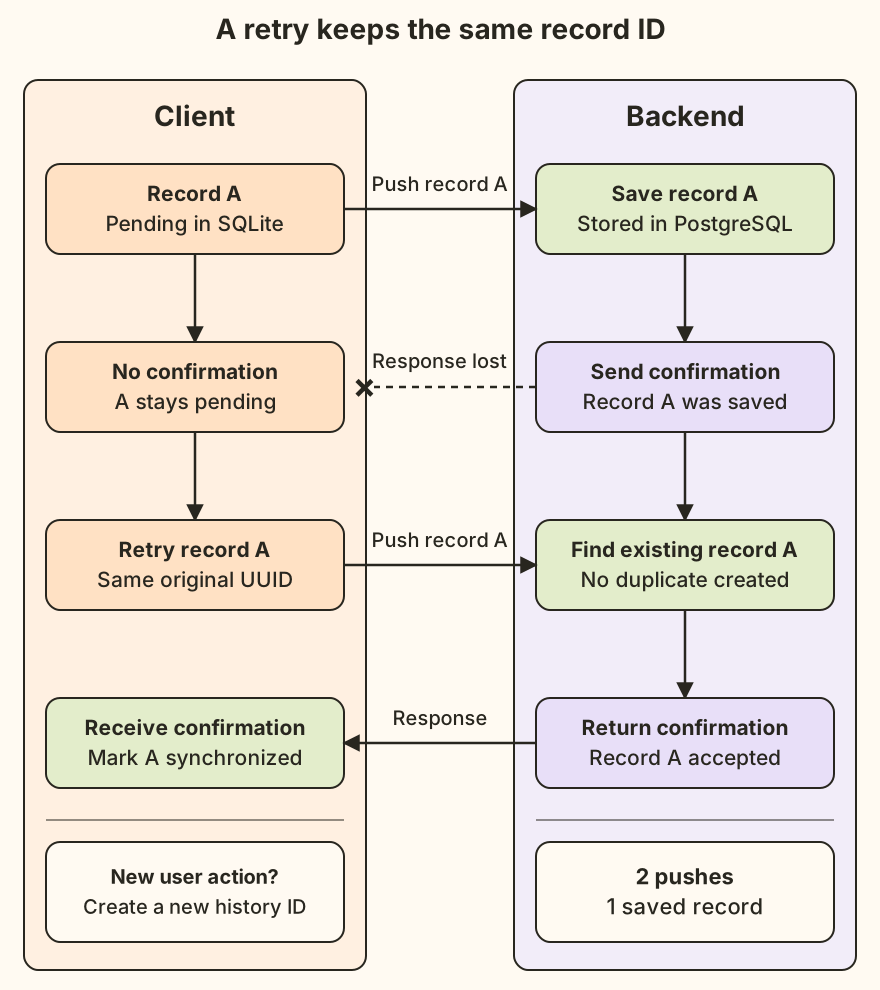
Open full-size diagram: retrying after a lost response
When devices disagree
Two devices can change the same Event, whether online or offline, before either has received the changes of the other. Both local saves can succeed, but the versions they push may disagree. The last device to synchronize doesn’t automatically win.
For example, you change your weekly Walk goal from 3 to 4 on your iPhone. Before your iPad receives this change, you set the same goal to 5 on your iPad. Both changes save locally, but the devices now push different goals for the same Event: 4 and 5.
The backend compares an incoming Event with its saved version, checking:
- Timestamps: when each version of the Event was last updated. These describe changes to the Event, rather than the sync timestamp used for pulls.
- Tracking periods The interval an Event records progress for, such as the current day or week. Reset Period sets how often a new interval starts; Lifetime keeps a running total. : the specific intervals an Event tracks, such as the current week for a weekly Walk goal. Matching counts from different weeks don’t describe the same progress.
- Lifecycle rules: which changes are allowed when an Event is active, paused Pause temporarily stops recording progress for an eligible Event. Resume lets it continue. Pausing is different from deleting the Event. , archived, or deleted. For example, a paused Event cannot record new progress.
An older version with different data is reported as a conflict rather than replacing the backend’s version. This prevents an older version from overwriting newer changes already saved by another device. Matching data for the same tracking period can be accepted without reporting a conflict, provided the update passes the backend’s validation for the Event lifecycle and the age of the incoming update.
Choosing which version to keep
On the iPhone and iPad, an Event rejected due to a conflict, remains “pending.” A normal pull preserves these pending local edits rather than overwriting them with the backend’s version. The conflict screen shows both versions so the user can choose between Keep Mine or Use Server Version.
This choice applies to the Event as a whole; it doesn’t merge individual fields from both versions. The Watch app uses a simpler conflict policy: it accepts the backend’s version when its push reports a conflict.
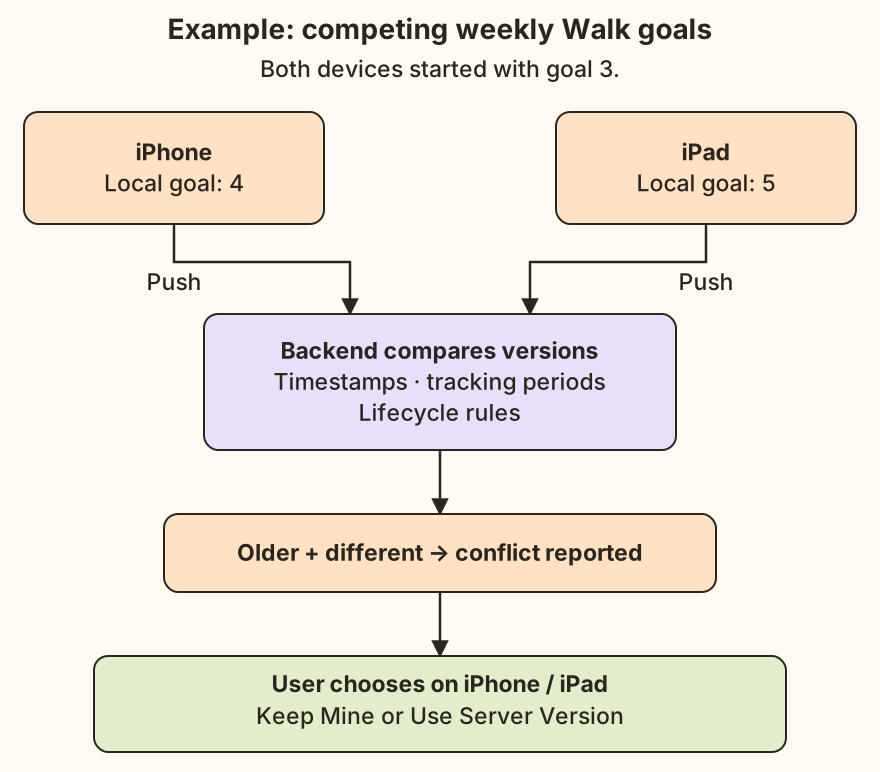
Open full-size diagram: competing edits to an Event
Deletions need to reach offline devices, too
Suppose an Event is deleted on the iPhone while the iPad is offline. Removing the Event from the backend entirely would leave the iPad with no record of the deletion. Its next push could recreate the Event!
The backend instead retains a deletion marker, commonly called a tombstone. Other devices pull this marker and apply the deletion locally. The backend also rejects pushes that would restore a deleted Event, even if an offline device has since edited it.
A backend deletion takes precedence over pending local edits to that Event. It is an explicit conflict rule, rather than treating whichever device reconnects last, as the authority.
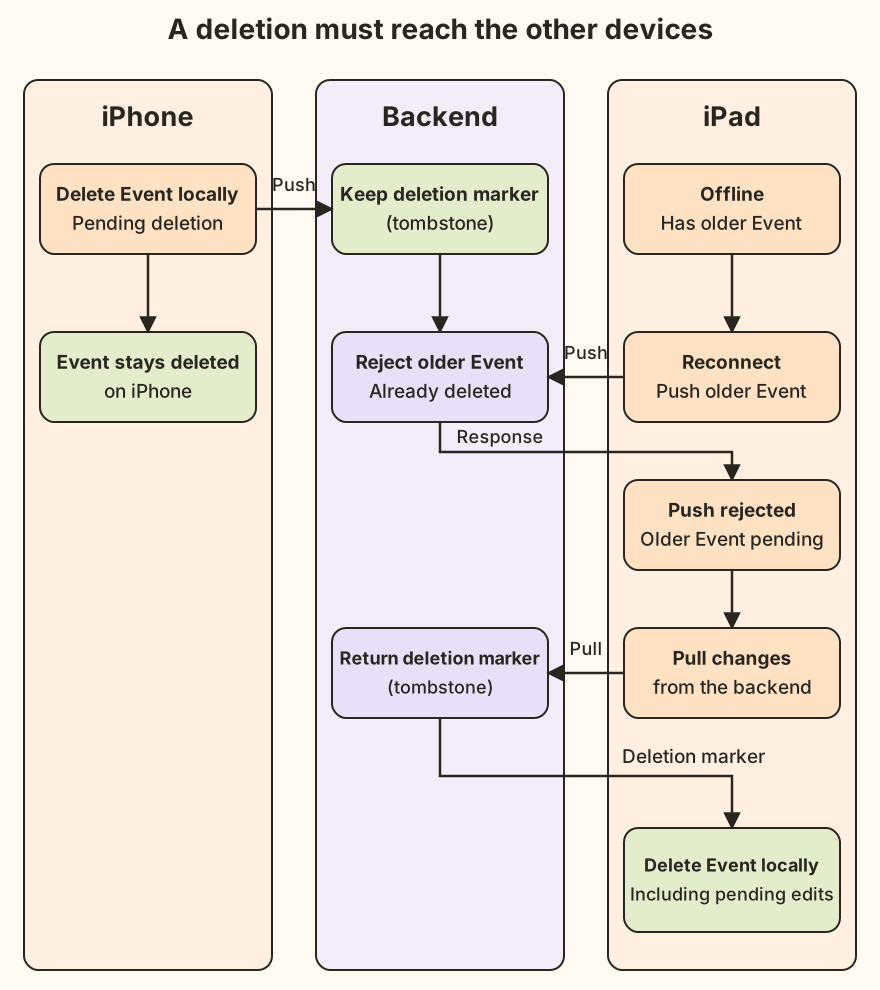
Open full-size diagram: deletions reaching other devices
The tradeoffs
This design lets each device keep working while synchronization waits for connectivity. The shared backend gives the devices a place to exchange updates; and, the push/pull flow gives each client a way remain synchronized.
Devices may temporarily show different data. A successful local save doesn’t instantly update every other device, and competing edits may require a choice about which version to keep. These are behaviors the app needs to explain clearly to the user.
Owning the synchronization behavior also means maintaining it. I need to test failed pushes, failed pulls, app restarts, competing edits, and deletions—not just the case where every request succeeds. Client and API changes also need to remain compatible with older supported app versions and preserve pending local changes during upgrades.
The architecture gives Accumoo responsive local saves and control over how these saves are replicated to other devices. Reliability depends on the details: which changes were accepted, what remains pending, and what happens on the next attempt.
Owning the Rails API gives me the freedom to make these choices, along with the responsibility of keeping them working as Accumoo evolves.