

You finish a walk, open Accumoo, and tap +. Your internet connection is down; now, you have to wait for a server to confirm your progress; an excellent way to make a completed walk feel like an unfinished request.
Instead, Accumoo saves the change on your device, locally, first. The UI immediately reflects the committed local change; synchronization Sync (synchronization) sends changes from your device to Mohojo Werks’ servers and brings those changes to your other devices when they sync. This keeps your Accumoo data up to date across devices. happens later - separately. If the network is unavailable, your changes are still recorded, your walk still counts.
Here’s how Accumoo handles the interesting part.
SQLite is the app’s working database
Accumoo’s mobile app is built with React Native, Expo, and TypeScript. Data is stored on the device using SQLite.
Each device has its own local state. This local copy is where everyday reads and writes take place.
I kept reads and writes local, with API calls out of the critical path.
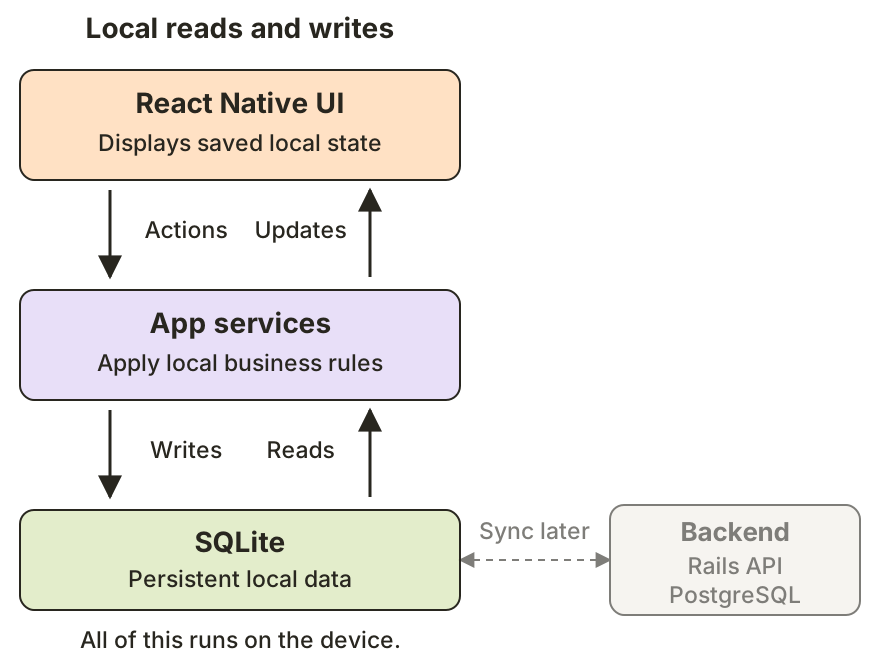
Open full-size diagram: local reads and writes
Local-first, but not exclusively
Local-first does not mean “the server is optional for everything.” Account setup and synchronizing multiple devices still require connectivity. The primary premise is this: when a user records progress, a temporary network outage will not cause the local action to fail.
The first save is an SQLite transaction
An Accumoo Event An activity you want to track, such as reading, walking, or staying hydrated. maintains its own current tracking state, such as count, goal, and period boundaries. There are also associated history A read-only view of recorded counts and past periods. Open an activity's menu to find it. records that describe Event actions and outcomes. These records are all related; however, each serves a unique purpose.
When a user records progress, the app checks whether the operation is allowed for the Event’s lifecycle and current period The interval an Event records progress for, such as the current day or week. Reset Period sets how often a new interval starts; Lifetime keeps a running total. (hour, day, week, month, year, or lifetime). Then, it:
- Updates the Event
- Inserts an Event History record
Both of these writes make up the user’s progress, and are safely encapsulated in a single SQLite transaction. The UI is only notified of changes after this transaction successfully completes.
Transactions matter - a lot.
If Event progress has changed, but its associated history record has not, we have a data integrity issue: the app would know that progress occurred, but it would not have the necessary history available to explain the details. Keeping both writes in a single transaction means they commit together - or not at all. This maintains data integrity.
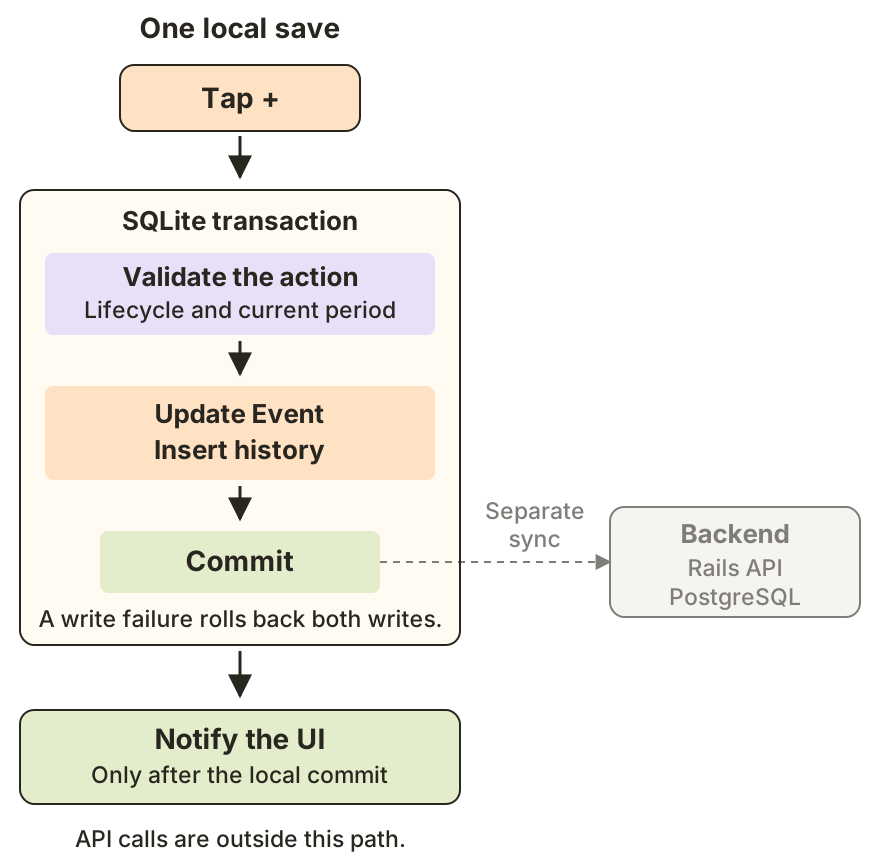
Open full-size diagram: one local save
The save has to survive an app restart
The committed data lives in SQLite, so it survives an app restart. It is not just an in-memory queue praying the app stays open long enough to reach the backend.
The UI is rendered using this saved local state when the app starts. A server acknowledgement is not what makes a local save durable.
The tradeoff: more responsibility, fewer stalled taps
A local-first design gives the app a responsive, durable place to record work before asking the network to distribute it.
The network is out of the critical path, but local storage still has to work. Local schema migrations need to preserve existing data. A failed transaction needs to be reported as a failed save, and the UI needs to reflect what actually committed.
The useful checks are local, too:
- Can users read existing data and record progress without a connection?
- Does a failed transaction leave the existing data intact?
- After an app restart, does the UI reflect the last committed state without waiting for the API?
For Accumoo, the goal is straightforward: the app should be able to record progress locally. A server outage may delay synchronization. It should not erase the walk.
Local-first is only part of the story. The other part is synchronization: getting those locally saved changes to the backend and the rest of the user’s devices. I’ll cover that in the next post.